
](https://file-host.link/website/workplacenh-iq7zjd/assets/blog-images/9c90a3eb-5193-4c60-b374-f1c365229265/1779746420307900_0cf94665d1cf46e4aca6566d9410f875/360.webp)
Introduction
Musculoskeletal disorders (MSDs) are not an abstract HR concern — they're a direct drag on production capacity. According to the Bureau of Labor Statistics, MSDs accounted for 272,780 days-away-from-work cases in US private industry in 2018, representing 30% of all such cases, with a median of 12 days lost per incident. In manufacturing specifically, the MSD incidence rate reached 27.7 per 10,000 full-time employees.
Those numbers translate to empty workstations, slower cycle times, and higher error rates — all before accounting for workers' compensation costs.
What drives those costs is rarely a single dramatic injury. It's accumulated exposure: a surface set two inches too high, a parts bin just outside comfortable reach, a sustained awkward posture repeated thousands of times per shift. Small mismatches compound into real operational damage.
This article outlines eight principles for ergonomic workstation design — a practical framework for facility planners, operations managers, and lab directors who need workstations that hold up across full shifts, varied workers, and demanding precision tasks.
TL;DR
- Ergonomic workstation design directly affects cycle time, defect rates, and injury risk, not comfort alone.
- Eight principles guide effective ergonomic design, from working height and lighting to parts positioning and planning tools.
- Small ergonomic mismatches compound across thousands of repetitions into measurable fatigue and long-term injury.
- Shared-station environments require height adjustability as a design requirement, not an optional feature
- Ergonomics should be designed in from the start, not patched in after problems appear
Why Ergonomic Workstation Design Is an Operational Variable
A workstation that forces a worker to raise their shoulders slightly, extend their reach by six inches, or tilt their neck forward to read a label doesn't feel like a crisis. Do that motion 4,000 times in a shift, five days a week, and you get progressive musculoskeletal loading that shows up as fatigue by noon, errors by mid-afternoon, and injury claims within months.
An industrial assembly workstation optimization study published in MDPI Safety found that ergonomic and lean workstation changes produced measurable operational results: roughly 35% lower mental workload, 5% productivity gain, 8% shorter working time, and 4–5% fewer defects — from adjustments to reach, fit, and layout alone.
The industries where this matters most are also the ones where repetitive precision tasks make failure most expensive:
- Assembly and manufacturing lines
- Pharmaceutical and chemical laboratories
- Medical device production
- R&D and engineering benches
- Quality control and inspection stations
In medical laboratory settings specifically, a study of laboratory professionals found that 58.9% reported work-related musculoskeletal symptoms in at least one body part over a 12-month period — with upper back, neck, and lower back as the most affected regions.
The eight principles below are interconnected design decisions — adjusting one without the others leaves the underlying problem partially solved. Each principle builds on the last, and the gains compound when the full framework is applied together.
Principles 1, 2, and 5: Height, Lighting, and Work Area Boundaries
These three principles define the physical envelope of the workstation — the spatial and environmental parameters that determine whether a worker can perform tasks without unnecessary strain.
Principle 1: Body Height and Working Height
Working height isn't a single number. It depends on both the worker's body dimensions and the nature of the task. CCOHS guidance establishes task-based height targets relative to elbow height:
- Precision work (electronics assembly, fine inspection): approximately 5 cm above elbow height
- Light assembly and mechanical work: 5–10 cm below elbow height
- Heavy downward-force tasks: 20–40 cm below elbow height
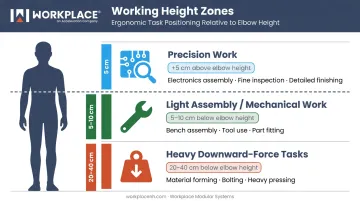
A surface set too high forces sustained shoulder elevation and static trapezius loading. Too low, and the worker flexes forward at the trunk, shifting spinal load toward passive tissues and accelerating lumbar fatigue.
Height adjustability isn't optional in shared-station environments. When multiple workers of different heights use the same fixed workstation, the height is inevitably wrong for most of them. Workplace Modular Systems addresses this directly: the Direct Drive® motorized workstation (its preferred solution for multi-user environments) provides 14 inches of height adjustability with a 500 lb static load capacity, adjustable with the touch of a button. Manual height-adjustable models offer a 30″–37″ range across seven positions, suitable for lower-traffic shared stations.
Principle 2: Proper Lighting
Lighting adapted to the specific task is a prerequisite for precision work. EN 12464-1, the European standard for indoor workplace lighting, defines maintained illuminance targets by task complexity:
| Assembly Type | Required Illuminance |
|---|---|
| Rough assembly | 300 lux |
| Medium assembly | 500 lux |
| Fine assembly | 750 lux |
| Precision assembly | 1,000 lux |
Low light levels are only part of the problem. Glare, harsh contrast, and uneven distribution cause the same outcomes: premature visual fatigue, concentration loss, and increased error rates. CCOHS notes that poor lighting directly reduces work quality in precision tasks and increases the likelihood of headaches and eye strain during extended shifts.
Workplace Modular Systems offers integrated task lighting options calibrated for bench work — including LED fixtures delivering up to 3,000 lumens with 5000K color temperature, mountable directly above the work surface via adjustable uprights, under-shelf brackets, or tilt-action positioning systems.
Principle 5: Work Area Height Boundaries
The active work area should remain within a height range that keeps the worker's arms below shoulder level and avoids excessive trunk flexion. NIOSH health hazard evaluations for manufacturing environments have recommended standing hand working heights roughly in the range of 29–47 inches depending on task and worker height.
Working above shoulder level carries well-documented injury risk. A systematic review published in PubMed found that severe arm elevation above 90 degrees is associated with shoulder disorders, with high-quality studies reporting odds ratios of 2.0 or higher.
The University of Waterloo's Centre of Research Expertise for MSD Prevention quantifies the exposure threshold more precisely: shoulder-disorder risk runs 2–3 times higher for overhead work, and arm elevation at or above 90 degrees for more than 10% of a shift alone can double injury risk.
Key exposure thresholds to design around:
- Arm elevation above 90° — associated with shoulder disorder odds ratios ≥2.0
- Overhead posture exceeding 10% of a shift — sufficient to double shoulder injury risk
- Sustained static positions at any height — more hazardous than alternating postures
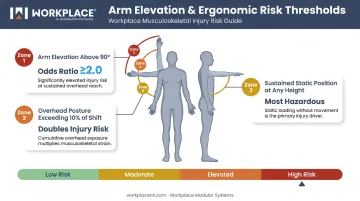
Workstation layouts should keep active tasks in a zone that avoids both overhead reaching and excessive forward bending. Alternating between seated and standing positions is consistently more protective than any sustained static posture, regardless of height.
Principles 3 and 4: Grab Area Optimization and Equipment Customization
Principles 3 and 4 address worker-to-task fit: configuring the workstation for the specific person doing the specific job.
Principle 3: Optimize the Grab Area
Every tool, container, and control element should fall within the worker's natural range of motion. NIOSH health hazard evaluations set clear benchmarks:
- Frequent task reaches: under 16 inches
- Infrequent task reaches: under 22 inches
Reaching beyond these limits — even moderately — recruits shoulder muscles in ways that accumulate across a full shift. Research on shoulder fatigue has shown that even moderate arm elevation above comfortable working height, repeated under load, measurably depletes oxygenated blood supply to the anterior deltoid and trapezius.
Practical placement logic:
- Highest-frequency items get the shortest reach distance — closest to the worker's body
- Heavy components go in lower, accessible positions to eliminate overhead or high-lateral lifting
- Parts containers should allow a smooth upward-curve motion when items are removed, not awkward gripping or rotation
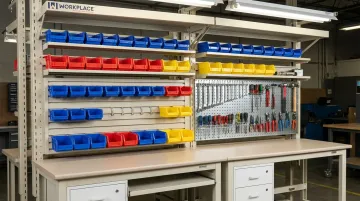
Workplace Modular Systems offers a purpose-built grab-area accessory system that mounts to vertical uprights above the work surface and repositions as workflow changes:
- Bin rails (standard and heavy-duty) with slope kits and extender kits to bring bins closer to the operator
- Louvered panel systems for free-form parts bin placement
- Articulating bin racks with double-pivot design
- Metal pegboard panels for tool organization
Principle 4: Customize Work Equipment to the Individual
A workstation set to a general standard still forces most workers to compromise. True customization means adjusting seat height, surface angle, tool placement, and monitor or equipment position to match the specific individual doing the specific task.
This is where modular design delivers real value. Workplace Modular Systems draws from more than 15,000 unique components to configure workstations: adjustable surfaces, accessory rails, monitor arms, keyboard trays, storage positioning, and surface material options (including ESD-safe laminates, phenolic resin, and chemical-resistant epoxy).
Any accessory can be added or reconfigured without replacing the base workstation, so individual adjustment is fast rather than disruptive.
The practical outcome: minimizing unnecessary movement reduces physical exertion across the shift. Workers who aren't compensating for poor fit are more consistent, more accurate, and less fatigued by end of day.
Principles 6 and 7: Parts Positioning and Range of Vision
This layer addresses motion economy — preserving worker capacity across the full shift by eliminating unnecessary physical and visual movement.
Principle 6: Strategically Position Parts
The principle here is simple: every inch of unnecessary reach, repeated thousands of times, adds to cumulative fatigue load. In labs and quality control environments, parts and sample containers positioned outside direct reach don't just cause fatigue — they slow throughput and increase handling errors.
The same NIOSH benchmark applies here: keep frequent-task material reaches under 16 inches. For heavier items, position at lower, accessible heights to eliminate the shoulder loading associated with overhead or high-lateral lifts.
What changes in Principle 6 versus Principle 3 is the emphasis on sequencing. Map the task flow and position items in the order they're accessed. A worker shouldn't have to reach across their body to grab the next component in sequence. Smooth, flowing motion between steps preserves both speed and accuracy.
Principle 7: Consider Range of Vision
Visual ergonomics are often the last thing checked and the first thing that causes end-of-shift fatigue complaints.
The distinction that matters for workstation design:
- Field of view: objects visible without any head or eye movement
- Visual field: objects requiring eye movement to see, but no head movement
Objects that require repeated head movement — labels on the wrong side of the bench, inspection zones at an angle, screens placed too far left or right — drive cervical strain through accumulated small movements.
A precision inspection study published in Applied Ergonomics found that repositioning a camera-based workstation to reduce neck flexion improved craniovertebral angle from 28.4° to 42.5° and reduced trapezius muscle activity from 13.1% to 8.65% of maximum voluntary contraction.
That evidence translates directly into workstation layout decisions. For display-equipped workstations, OSHA's computer workstation guidelines recommend:
- Viewing distance of 20–40 inches
- Monitor center 15–20 degrees below horizontal eye level
- Monitors no more than 35 degrees left or right of the direct line of sight
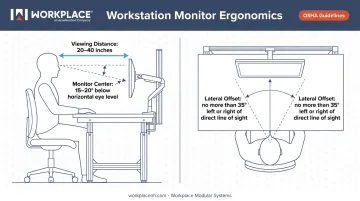
The same logic applies to non-display bench work. Inspection zones, parts labels, digital work instructions, and quality control reference materials should all sit within the worker's primary field of view — positioned for the operator, not for the facility planner's layout convenience.
Principle 8: Planning Tools, Consultative Design, and the Business Case
Using Planning Aids to Eliminate Guesswork
Principle 8 is about designing correctly before building — not troubleshooting after problems emerge. Software-based layout tools, configuration modeling, and ergonomic assessment let facility planners test workstation configurations against real workflow parameters before committing to physical build-out.
Workplace Modular Systems supports this through a structured six-stage process (Consult, Design, Review, Execute, Deliver, and Consult) that begins with a single question: "What are you doing in this space?" That question surfaces workflow, task sequence, tool requirements, worker variability, and space constraints before a single component is specified.
Design Specialists then share drawings and configuration models with the customer before manufacturing begins, allowing layout problems to be caught and corrected at the design stage — not after installation.
The configurator includes preset configurations for specific verticals that serve as starting points rather than forcing customers to design from scratch:
- ESD electronics assembly
- EV battery manufacturing
- Robotics and cobot platforms
The ROI Argument for Operations Managers
The business case for ergonomic investment is well-documented in primary sources:
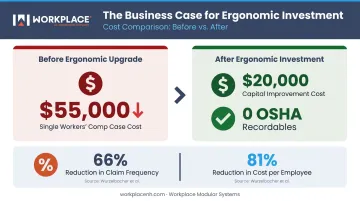
- OSHA's Abbott case study documented $20,000 in ergonomic capital improvements against a prior single workers' compensation case costing $55,000 — with zero OSHA recordables on the affected line afterward
- A prospective study by Wurzelbacher et al., covering 33 employers and 535 employees, found that insurer-supported engineering controls reduced claim frequency per 100 employees by 66% and cost per employee by 81%
The math is straightforward: reduce one serious MSD case per year, and the ergonomic upgrade has paid for itself. The larger gains — throughput consistency, lower defect rates, reduced absenteeism — compound across the full workforce.
Ergonomic workstation design is most cost-effective when built into the original specification. Retrofitting after problems emerge typically costs two to three times more and still leaves the root cause partially unaddressed — which is exactly the scenario a consultative design process is built to prevent.
Frequently Asked Questions
What is the 90/90/90 rule for ergonomics?
The 90/90/90 rule refers to maintaining 90-degree angles at the ankles, knees, and hips when seated, with elbows also at approximately 90 degrees. This neutral posture reduces musculoskeletal strain during extended seated work by minimizing static loading on the spine, shoulders, and lower limbs.
What is the 30/30 rule in ergonomics?
The 30/30 rule recommends taking a 30-second break every 30 minutes of sustained static posture or repetitive motion. Brief movement breaks reduce cumulative fatigue and prevent the progressive musculoskeletal strain associated with prolonged fixed positions.
What are the ergonomic standards for workstations?
The primary standards bodies are OSHA, NIOSH, and ISO. Their guidelines cover working heights, reach zones, lighting levels, and force limits, with specific benchmarks varying by industry and task. ISO 14738 and ISO 11226 address anthropometric design and static posture evaluation respectively.
What is ergonomics in the industrial workplace?
Industrial ergonomics is the practice of designing equipment, workstations, and workflows to match the physical and cognitive capabilities of workers. The goal is to reduce injury risk, minimize fatigue, and optimize productivity, especially in manufacturing, assembly, and laboratory environments where repetitive tasks are common.
What is the ideal working height for an ergonomic workstation?
Optimal working height depends on both task type and individual worker dimensions. CCOHS guidance recommends precision work approximately 5 cm above elbow height, light assembly 5–10 cm below, and heavy manual tasks 20–40 cm below elbow height. Adjustable-height workstations are the most reliable solution for accommodating individual variation.
How does ergonomic workstation design reduce workplace injuries?
Ergonomic design addresses root causes of musculoskeletal injuries: awkward postures, excessive reach, repetitive strain, and prolonged static loading. By configuring workstations to keep workers within natural ranges of motion, it prevents the cumulative exposure that leads to both acute injuries and chronic conditions.