Introduction
Budgeting for modular workstations is harder than it looks. Prices span an enormous range depending on the application—a basic assembly bench looks nothing like a cleanroom lab station or a heavy-duty industrial workbench, and the cost reflects those differences.
The market backing this demand is substantial. The North American laboratory workstation and storage furniture market was valued at $1.33 billion in 2023, growing at 8.3% annually. U.S. construction spending on manufacturing facilities reached a record $240.1 billion in August 2024—roughly three times 2020 levels.
This guide covers real price ranges, the factors that drive costs up or down, a full cost breakdown, and how to budget accurately for the configuration you actually need.
Key Takeaways
- Modular workstations range from under $200 for basic office setups to $2,000+ for fully custom industrial or lab-grade configurations
- Primary cost drivers: workstation type and environment, frame and surface materials, load capacity, level of customization, and accessories
- Light office buyers will find adequate options at lower price points — labs, pharma, aerospace, and medical device sectors should budget mid-to-high-end
- Industrial and lab environments that need regulatory compliance or specialized surfaces typically require custom configurations
- Higher upfront investment in true modular systems pays off through reconfigurability — systems adapt as needs change rather than requiring full replacement
How Much Do Modular Workstations Cost? (Pricing Overview)
Modular workstation pricing spans a wide range — from basic single-surface office units to fully engineered, multi-station lab or industrial systems. Understanding where your project falls within that range prevents both sticker shock and underbudgeting.
The most common budgeting errors buyers make:
- Underbudgeting for installation, delivery, and accessories
- Selecting the wrong workstation category for the environment
- Overlooking future reconfiguration or upgrade costs
Entry-Level / Basic Setup
Typical Range: $185–$650
Entry-level modular workstations include standard laminate or particleboard worksurfaces, light-duty steel frames, minimal accessories, and limited customization. Particleboard-top benches at this tier start around $185, while laminate-top versions run $199–$365 — suitable for environments with light loads and no specialized surface requirements.
Best suited for:
- Small offices and light administrative tasks
- General-purpose workshops
- Low-load inspection stations
Once your environment demands heavier loads, specialized surfaces, or ergonomic adjustability, mid-range configurations become the practical choice.
Mid-Range / Standard Setup
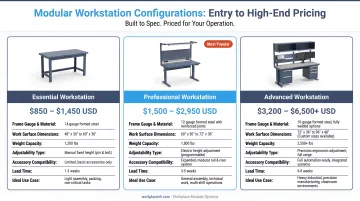
Typical Range: $600–$1,500
Mid-range configurations feature:
- Heavier-gauge steel frames
- Phenolic resin, ESD, or stainless steel work surfaces
- Ergonomic height adjustment (crank or manual)
- Standard accessories like shelving, pegboard, or task lighting
Heavy-duty benches in this tier typically start around $599, while ESD-rated workstation sets with shelving run around $1,199.
Ideal for:
- Manufacturing assembly lines
- Quality control stations
- Electronics assembly (ESD environments)
- Standard lab benches
- Training facilities
For pharmaceutical, cleanroom, or specialized R&D environments, standard configurations rarely meet compliance or performance requirements — which is where high-end and custom systems earn their cost.
High-End / Custom Setup
Typical Range: $1,200–$2,000+
High-end and custom modular workstations include:
- Custom-fabricated frames with 1,000–1,500 lb load capacity
- Specialized surfaces: ESD laminate, stainless steel (Type 304 or 316), epoxy resin, phenolic resin
- Integrated power and data routing
- Compliance-ready finishes (ISO cleanroom, ANSI/ESD, cGMP pharmaceutical)
- Advanced ergonomics (hydraulic height adjustment)
Stainless steel lab tables range from $450 to $1,600+ based on steel grade and configuration complexity. Hydraulic-adjustable workstations typically exceed $1,779.
Common applications:
- Pharmaceutical and chemical labs
- Cleanroom manufacturing
- Medical device production
- Aerospace and defense facilities
- R&D centers with specialized instrumentation
Key Factors That Affect the Cost of Modular Workstations
Technical specifications, intended environment, and customization requirements all shape modular workstation pricing. Knowing which factors matter most for your application helps you spend where it counts — and skip what you don't need.
Type and Work Environment
The intended setting establishes the baseline cost:
- Office workstations: Standard laminate surfaces, lighter frames, lower load ratings
- Industrial benches: Heavier steel frames, higher load capacity, reinforced construction
- Laboratory workstations: Chemical-resistant surfaces, compliance-ready finishes, integrated utilities
A stainless-steel lab bench is engineered differently than a standard laminate office unit, and the price reflects that gap.
Size, Footprint, and Order Quantity
Pricing varies based on:
- Surface dimensions: Width × depth (common sizes: 24"–36" depth, 48"–72" width)
- Configuration type: Single-surface, L-shape, U-shape, corner unit
- Order volume: Multi-unit orders typically reduce per-unit pricing by 2–4%; larger institutional orders may see savings of 20–40%
Material and Build Quality
Frame construction sets the structural baseline. Standard workstations use 18-gauge furniture-grade steel tubing with load ratings around 800 lbs. Industrial-grade units step up to 14-gauge heavy-duty steel with full-perimeter frames, supporting up to 1,500 lbs.
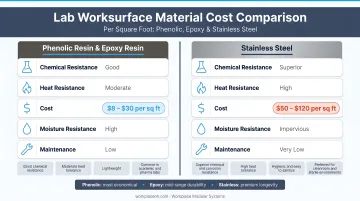
Worksurface material drives the largest cost variable:
- Plastic laminate: baseline pricing
- Phenolic resin: $65–$110/sq ft (22% lower than epoxy)
- Epoxy resin: $100–$200/sq ft (withstands 149+ chemical reagents)
- Stainless steel (Type 316): $150–$250/sq ft (40–60% premium over epoxy)
Heavier-duty materials increase upfront cost but reduce long-term replacement frequency, making them cost-effective over time.
Level of Customization and Accessories
Customization premium:
- Off-the-shelf modular configurations carry catalog pricing
- Custom-engineered solutions typically add 15–20% surcharge
Accessories that compound costs:
- Overhead shelving ($150–$400)
- Monitor arms ($75–$200)
- Task lighting ($100–$300)
- Integrated power strips and outlets ($50–$150)
- Drawer banks ($200–$600)
- Pegboard panels ($50–$150)
- Ergonomic height-adjustment mechanisms ($300–$800)
- Technology integration points (data ports, cable management)
Each add-on increases the final price, so identifying near-term needs versus future upgrades keeps your budget on target.
Cost Breakdown of a Modular Workstation
The total cost of a modular workstation extends well beyond the unit's purchase price. Buyers who only budget for the sticker price routinely face shortfalls once installation, accessories, and ongoing costs are factored in.
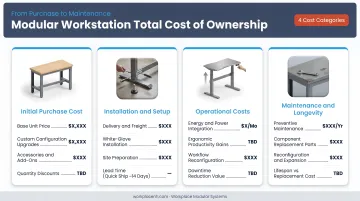
Four cost categories shape the total investment:
- Initial purchase — The workstation units themselves, priced by type, configuration, materials, and quantity. Largest single line item, but still only part of the total.
- Installation and delivery — LTL freight typically runs $350–$1,400 per item; white-glove delivery runs $1,200–$3,000. Assembly labor averages $35–$65 per hour, with simple setups taking 2–4 hours and complex multi-unit jobs running a full day or more.
- Accessories and upgrades — Components added or swapped as operational needs evolve. Budget for likely near-term add-ons when placing your initial order to avoid a second freight event.
- Maintenance and repairs — Surface refinishing, hardware replacement, and periodic inspection over the workstation's lifespan. Quality powder-coated steel frames with chemical-resistant surfaces keep this cost low; plan for roughly $50–$150 annually for minor adjustments.
Specialized site conditions — cleanrooms, raised floors, or large facility footprints — can push installation costs well above standard estimates. Factor those variables in early, before finalizing your budget.
Budget vs. Premium Modular Workstations — What's the Difference?
The price gap between budget and premium modular workstations reflects real differences in materials, engineering precision, and long-term operational flexibility—not just brand positioning.
| Dimension | Budget Workstations | Premium Workstations |
|---|---|---|
| Frame durability | 16–18 gauge steel, lighter construction | 14–18 gauge heavy-duty steel, welded full-perimeter frames |
| Rated load capacity | 400–800 lbs | 1,000–1,500 lbs |
| Surface material compatibility | Limited to laminate or particleboard | Chemical-resistant epoxy/phenolic, ESD, stainless steel (Type 304/316) |
| Customization | Pre-configured; limited accessory options | Fully modular with 15,000+ configurable components |
| Ergonomic adjustability | Fixed height or manual adjustment | Crank or hydraulic motorized height adjustment |
| Reconfigurability | Difficult to modify; often requires replacement | Components reusable; accessories easily added/removed |
| Compliance readiness | General commercial use only | ISO 14644 cleanroom, ANSI/ESD S20.20, cGMP pharmaceutical, MIL-STD-1472 |
| Warranty | 3–5 years limited | 10 years to lifetime |
Those differences compound over time. A well-engineered modular system delivers better ROI than a budget unit that needs replacement within a few years—because modular workstations allow height and layout changes without cutting or welding, and stations can be repurposed rather than discarded.
If a task or workflow is likely to change within 12–24 months, a modular system pays for the difference.
How to Estimate the Right Budget for Your Modular Workstation
Fit determines value: the right budget is set by the specific work environment, compliance requirements, expected load, and how often the configuration will change—not by the lowest available price point.
Key questions that define a realistic budget:
- What type of work is being performed and in what environment? (office, lab, industrial, cleanroom)
- What are the ergonomic and regulatory requirements? (ANSI/ESD, ISO cleanroom, cGMP, OSHA 1910)
- What load capacity is needed? (light office use vs. heavy equipment)
- What accessories are needed at launch vs. phased in later? (lighting, power, shelving, storage)
- How many units are needed, and what is the projected layout? (single workstation, in-line, U-cell, corner)
Once you've worked through those questions, the next step is turning answers into a configuration—and that's where a structured consultation matters more than catalog browsing.
Start with a Consultative Assessment
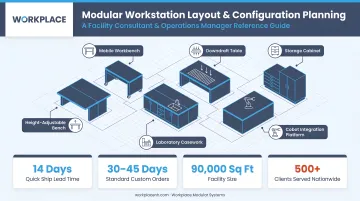
Work directly with facility planners, lab directors, and operations managers to evaluate workflow, space constraints, and functional requirements before settling on a configuration. Workplace Modular Systems follows a six-stage process—Consult, Design, Review, Execute, Deliver, Consult—opening with a straightforward question: "What are you doing in this space?" That answer shapes everything from layout to load rating.
Evaluate Total Lifecycle Cost
Initial purchase, installation, accessories, maintenance, and future reconfiguration provide a more accurate budget picture than comparing unit prices alone. Modular systems often cost more initially but lower total cost of ownership over several years by reducing redesign, downtime, and replacement costs.
What Most People Miss When Pricing Modular Workstations
Most pricing mistakes happen before a single workstation ships. These are the four that cost buyers the most:
- Counting only the unit price — freight, installation, accessories, and future reconfiguration costs can significantly increase total spend and catch teams off guard mid-project
- Choosing the lowest-priced option without confirming load capacity, surface material compatibility, or whether the system can accept future accessories — often leading to premature replacement or expensive mid-cycle upgrades
- Mismatching spec to application — lab-grade stainless on a light assembly bench wastes budget; basic laminate on a high-load industrial station fails early; both are poor value regardless of purchase price
- Ignoring reconfiguration costs — a modular system's real financial advantage is adaptability; a workstation reconfigured in-house without new procurement delivers long-term savings that offset a higher upfront cost, and lean U-cell layouts alone have cut manufacturing lead times by up to 50%
Frequently Asked Questions
What is the average cost of an office workstation?
Commercial and light-duty modular workstations typically start in the $400–$800 range for standard configurations. Industrial and lab-grade units run $800–$2,000+, depending on surface material, load capacity, and accessories. Entry-level options use laminate or standard steel tops; specialized surfaces like epoxy resin or stainless steel push costs higher.
How much do industrial or lab-grade modular workstations typically cost?
Industrial and lab-grade configurations typically run $600 to $2,000+—due to heavier-gauge materials, specialized work surfaces (ESD, stainless steel, epoxy resin), higher load ratings (1,000–1,500 lbs), and greater customization requirements for compliance-ready environments.
What factors most affect the price of a modular workstation?
Workstation type and environment, frame and surface materials, load capacity, level of customization, accessories, and order quantity are the primary cost drivers. For example, stainless steel Type 316 surfaces cost 40–60% more than epoxy resin, while custom-engineered solutions add 15–20% over catalog pricing.
Are modular workstations more cost-effective than traditional fixed workstations?
Modular systems often carry higher upfront prices but lower total cost of ownership by reducing redesign, downtime, and replacement costs. Height and layout changes require no cutting or welding, and accessories can be added as processes evolve—so stations get repurposed rather than scrapped.
How long do modular workstations typically last?
Standard commercial office furniture is designed for approximately 10-year replacement cycles, with 3–10 year warranties. Industrial-grade modular workstations have expected service lives of 10–15 years, while epoxy resin lab countertops last 15–20+ years. Stainless steel surfaces have virtually unlimited lifespans.
Can I add accessories or expand a modular workstation after purchase?
Most modular systems accept future add-ons—shelving, lighting, power strips, and ergonomic accessories. Confirm component compatibility at purchase and budget for likely accessories upfront to avoid surprises. Workplace Modular Systems offers over 15,000 configurable components that integrate as your needs change.